Acckit Check
What it is used for
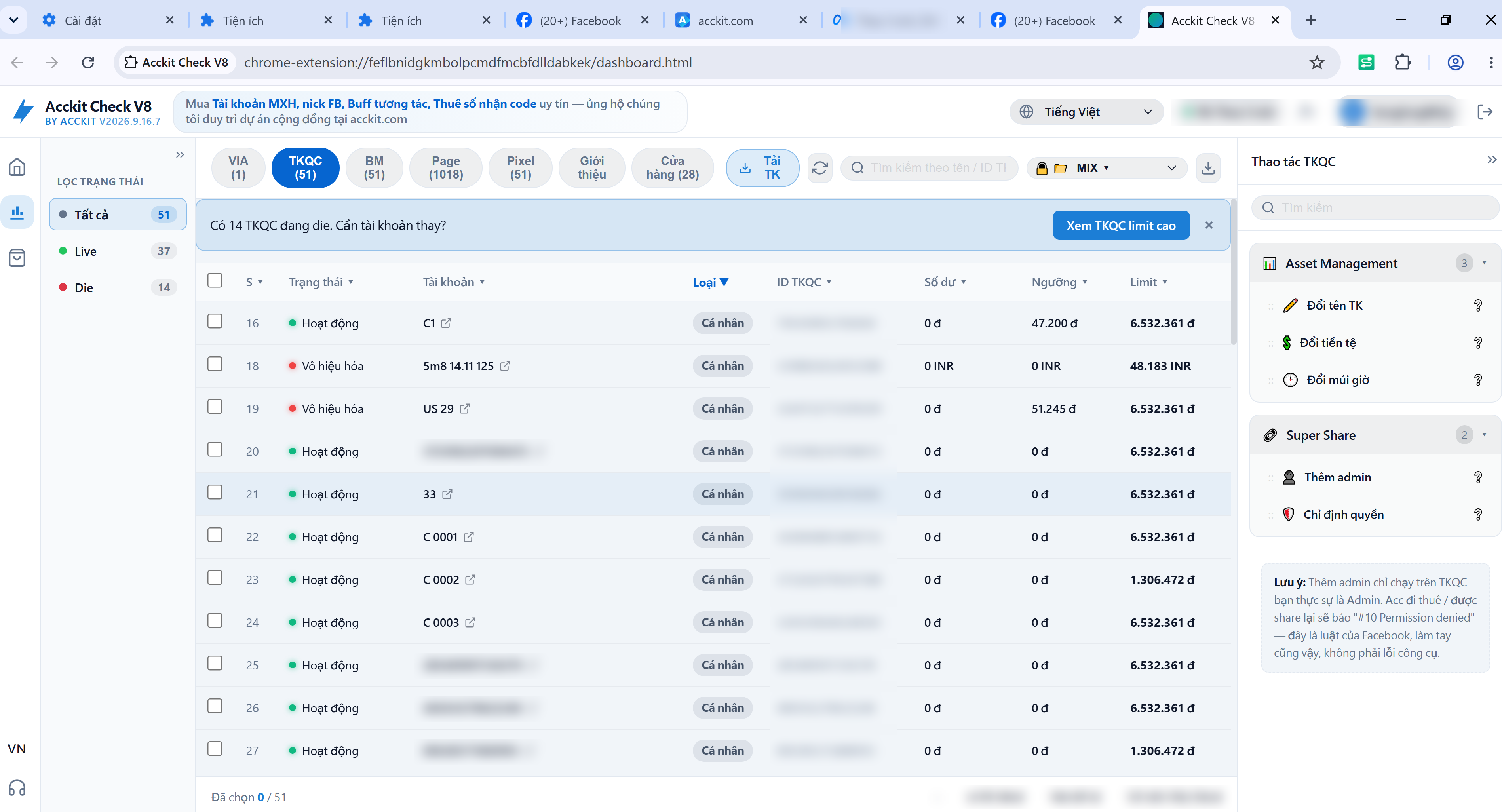
- View ad limit, threshold, balance, and currency of every ad account in a single table
- View list of BM, Pages, Pixels, and administrators associated with each account
- Filter Live / Die, group by status, export to CSV for delivery or reconciliation
- Add admins, rename accounts, and change currency with a single click
Step-by-step installation
-
Download and extract
Download acckit-check.zip and extract to a folder. Keep note of that folder location — you will select it shortly. Do not delete the folder after installing: Chrome runs the extension directly from it.
-
Open Chrome Extensions page
Open Chrome, type chrome://extensions into the address bar, and press Enter.
-
Turn on Developer mode
Toggle the Developer mode switch in the top-right corner. If disabled, the load button in the next step will not appear.
-
Load unpacked extension
Click Load unpacked, select the folder from Step 1. If you accidentally select the parent directory, Chrome will report missing manifest.json — navigate into the folder containing that file.
-
Sign in and start using
Click the extension puzzle icon on the toolbar, log in with your acckit account. Pin the extension to your toolbar for quick access.
Why you can trust this installer
Chrome and Windows score an installer based on two things: whether it is signed with a digital certificate, and how many people downloaded it. Neither has anything to do with what is inside the file.
Acckit has not purchased a code signing certificate yet — certificates suitable for this cost hundreds of dollars each year. Therefore, all our installers are flagged as "unknown publisher". We state this upfront rather than leaving you to wonder.
This is the most certain way to know the file on your machine is exactly what we released, with no tampering in transit.
48e552d38446059dba66b8b873482ddd1e9f99bfe252e7a63f3040d48d44c858
Open PowerShell on your computer, run the command below, and compare it with the hash above. An exact match confirms the file is authentic:
Get-FileHash .\acckit-check.zip -Algorithm SHA256If it does not match, do not install — re-download from this page and let us know.
Files can only be downloaded after signing in to your acckit account — the same account you use to buy products, deposit funds, and file warranty tickets. We do not distribute files anonymously through chat groups or third-party mirrors.
Listed transparently, nothing hidden:
- acckit.com — signs in and checks if a newer version is available.
- GitHub, Mozilla, download.wayfern.com — downloads browser binaries directly to your machine. This is why the first run requires a brief initial setup.
- Proxies you enter — only the proxies configured in the app, nothing else.
- Websites you open inside browser profiles — Facebook, YouTube, email… just like a regular browser.
The source code contains zero behavioral tracking libraries — no Google Analytics, no Sentry, no telemetry. Furthermore, the software disables Firefox telemetry in every profile it creates.
After downloading, before installing, submit the file to VirusTotal — it scans with over 70 antivirus engines simultaneously for free. You do not need to take our word for it, just read the results.
Or test inside Windows Sandbox or a virtual machine before installing on your main PC. For anyone managing hundreds of accounts, this step is well worth doing, even for digitally signed software.
Frequently Asked Questions
Chrome puts newly installed extensions under the puzzle piece icon on your toolbar. Click the puzzle icon and pin Acckit Check to make it visible.
The extension reads data from active Facebook sessions in the current browser. Open a tab on Facebook, make sure you are signed in, and click the extension icon again.
The extracted directory was moved, renamed, or deleted. Extract the zip again and reload the extension following step 4.
ดาวน์โหลด
ลงชื่อเข้าใช้เพื่อดาวน์โหลด- Fileacckit-check.zip
- File size272 KB
- Version2026.9.21.3
- Updated21/09/2026